vipsdips 4.2 is out, and it has a fun new feature: a simple image paintbox.
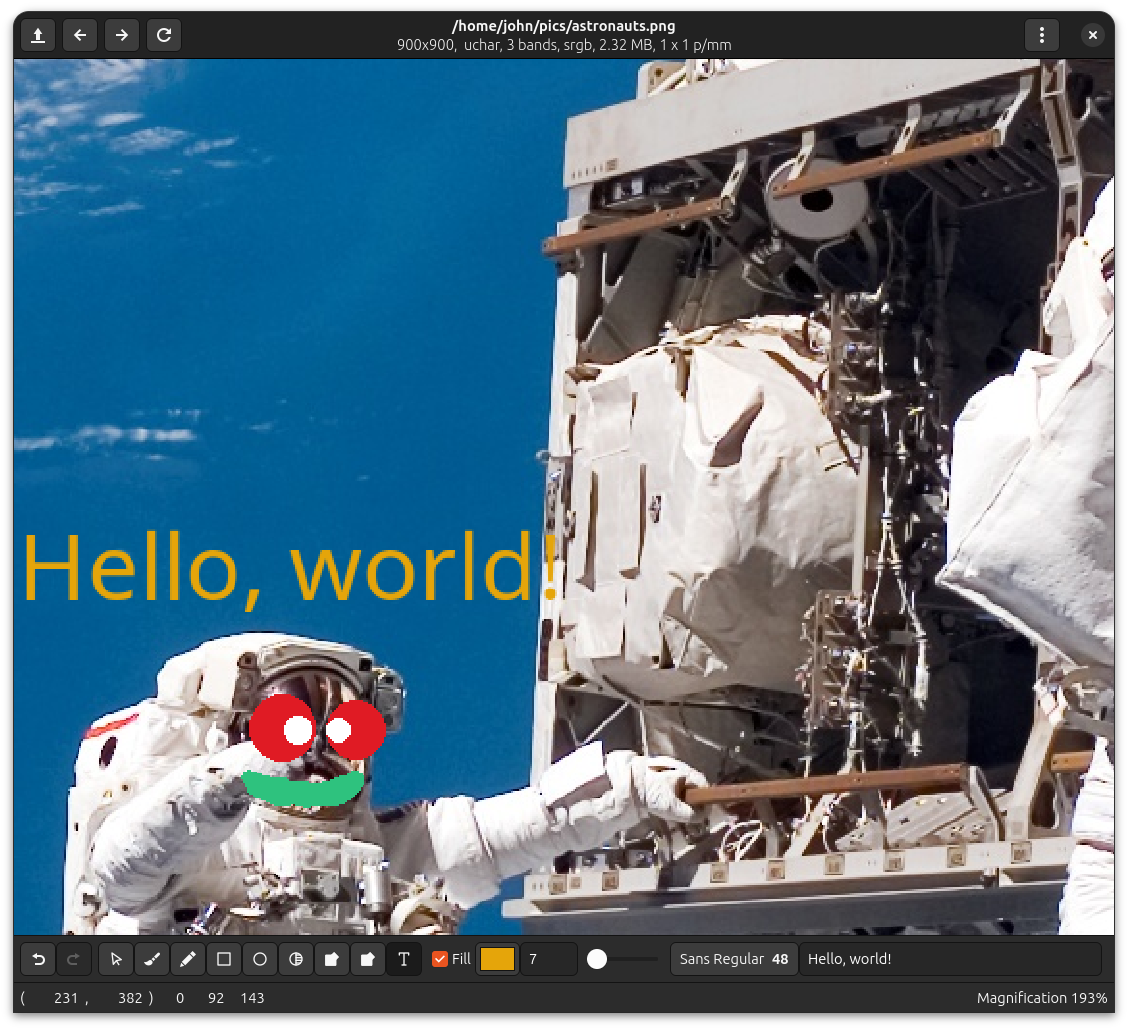
It’s pretty basic, but it’s enough for simple image annotations.
It will force the whole image into memory, so you can’t use it on extremely large objects. We’re hoping to add some more features in the next version.
Use View > Paintbox to open the paintbox bar.
The first box has buttons for paintbox undo and redo. You can also use ctrl-Z and ctrl-Y as shortcuts.
The next box has a set of radio buttons which set the current tool. From the left they are:
- pointer mode (ie. paintbox is off)
- freehand draw, use the slider to set brush width
- straight line draw, use the slider to set brush width
- draw a box, filled or empty
- draw a circle, filled or empty
- smudge, use the slider to set brush width
- fill until equal to ink
- fill while equal to start pixel
- render text
You can use shift-drag to pan the image whatever tool is selected.
The final box has the tool parameters. From the left they are:
- circles and rectangles can be empty of filled
- the current ink, click to change the ink colour
- brush width for line drawing
- current font for text
- string to draw